

Коммутатор Huawei S5731-S48T4X
Б/У


Артикул:
002358

Коммутатор Huawei S5731-S48T4X (48*10/100/1000BASE-T ports,4*10GE SFP+ ports,without power module)
Подробнее
Для физических лиц
156 860 ₽/шт
Для юридических лиц с НДС 5%
156 860 ₽/шт
Нет в наличии
Срок гарантии:
3 мес.
Нашли дешевле?
Под заказ
Наши менеджеры обязательно свяжутся с вами и уточнят условия заказа
Цена действительна только для интернет-магазина и может отличаться от цен на других интернет площадках.
Описание
S5731-S48T4X (98011847)
Overview
Table 4-1236 Basic information about the S5731-S48T4X| Item | Details |
|---|---|
| Description | S5731-S48T4X (48*10/100/1000BASE-T ports, 4*10GE SFP+ ports, without power module) |
| Part Number | 98011847 |
| Model | S5731-S48T4X |
| First supported version | V200R021C10SPC600 |
| Supported Patch Version | If V200R021C10SPC500 is used, install V200R021HP0121 or a later patch. |
Components
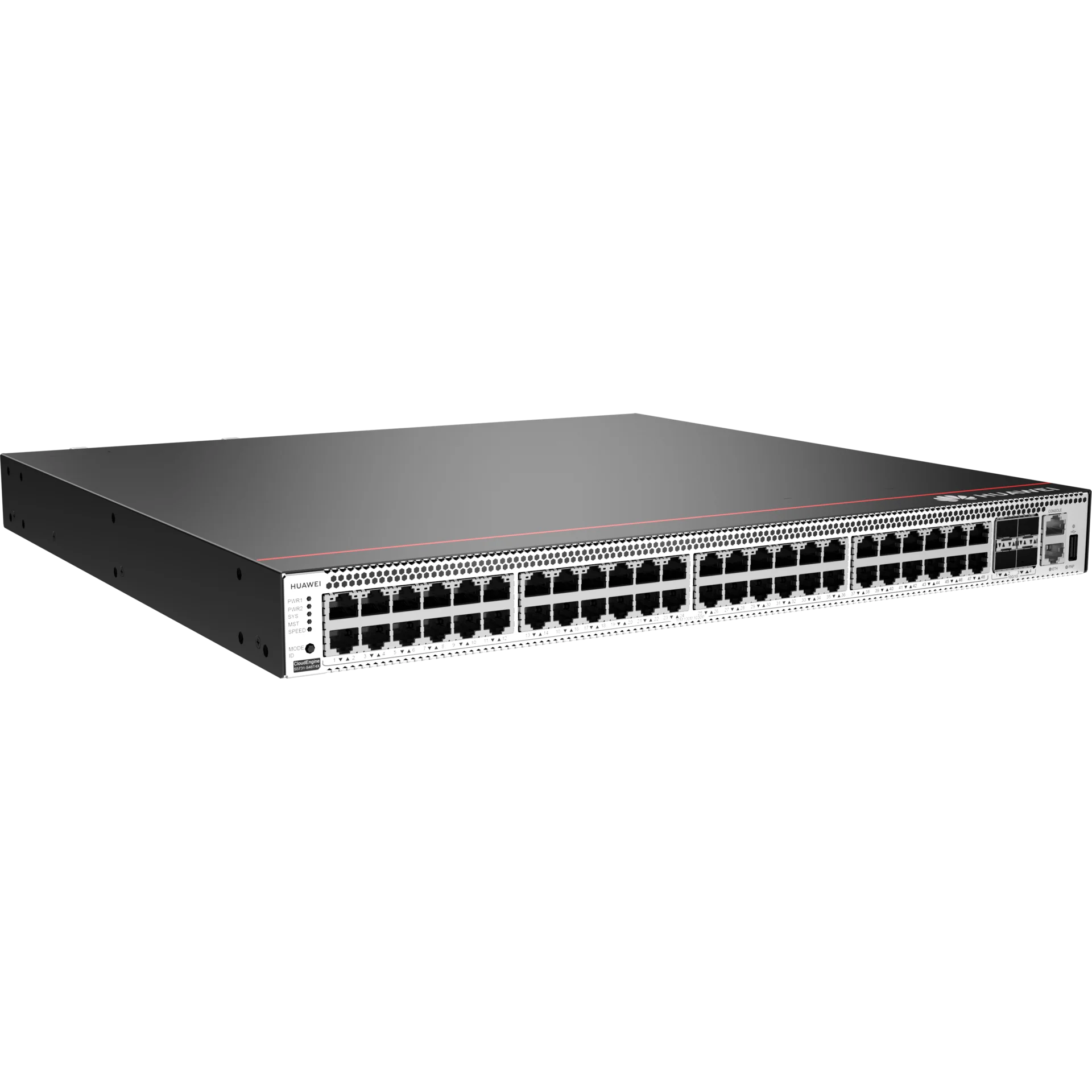
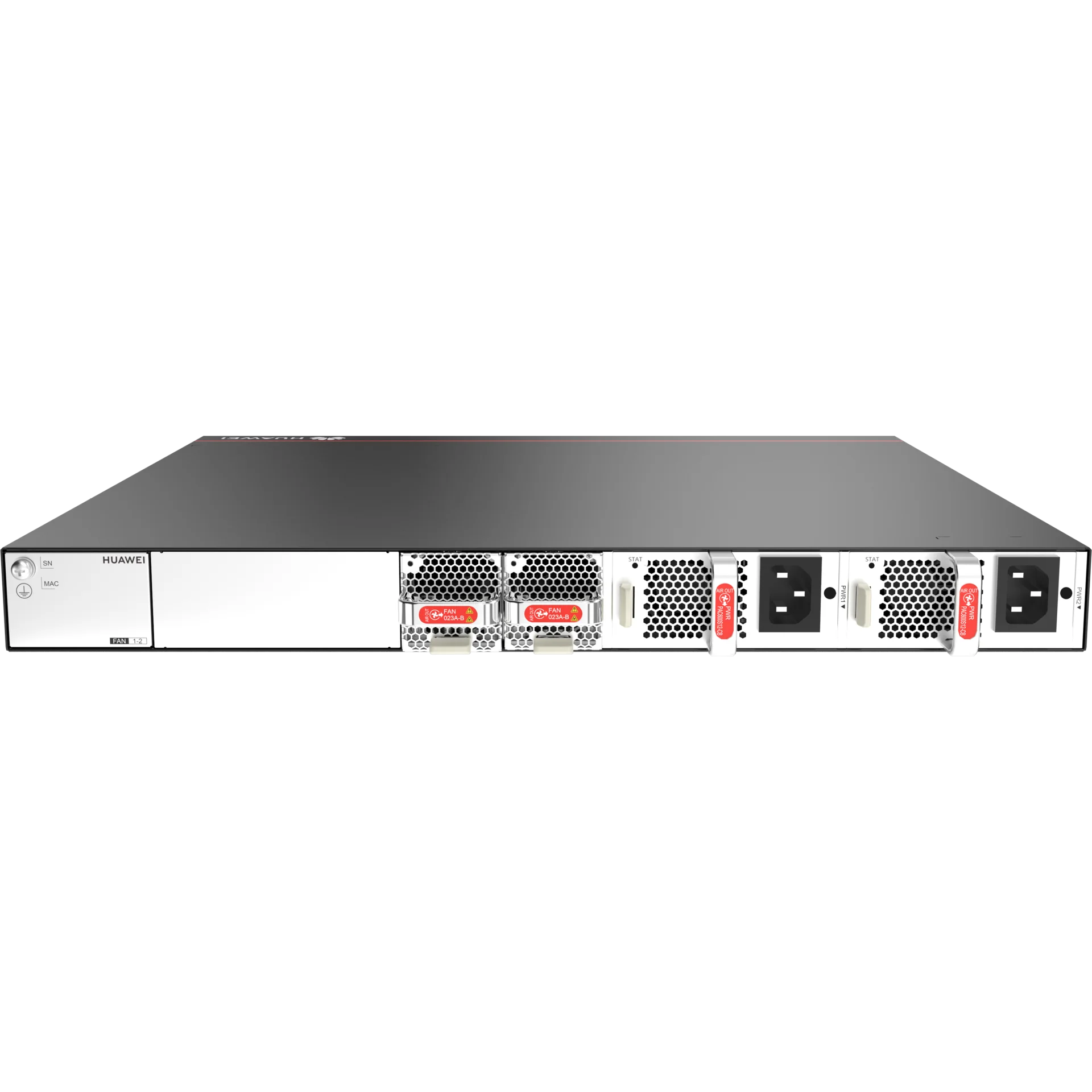
Figure 4-488 S5731-S48T4X appearance
|
1 |
Forty-eight 10/100/1000BASE-T ports |
2 |
Four 10GE SFP+ optical ports |
|
3 |
One console port |
4 |
One ETH management port |
|
5 |
One USB port |
6 |
One PNP button NOTICE:To restore the factory settings and reset the switch, hold down the button for at least 6 seconds. To reset the switch, press the button. Resetting the switch will cause service interruption. Exercise caution when you press the PNP button. |
|
7 |
Ground screw NOTE:It is used with a ground cable. |
8 |
Power module slot 1 NOTE:Applicable power modules:
|
|
9 |
Power module slot 2 NOTE:Applicable power modules:
|
- |
- |
Ports
Table 4-1237 Ports on the S5731-S48T4X| Port | Connector Type | Description | Available Components |
|---|---|---|---|
| 10/100/1000BASE-T port | RJ45 | A 10/100/1000BASE-T Ethernet electrical port sends and receives service data at 10/100/1000 Mbit/s. | |
| 10GE SFP+ optical port | SFP+ | A 10GE SFP+ Ethernet optical port supports auto-sensing to 1000 Mbit/s. It sends and receives service data at 1000 Mbit/s or 10 Gbit/s. |
|
| Console port | RJ45 | The console port is connected to a console for on-site configuration. | |
| USB port | USB 2.0 Type A |
The USB port can have a USB flash drive connected to upgrade the switch, or transfer configuration files or other files. The USB port can only connect to a USB flash drive that complies with USB 2.0. USB flash drives from different vendors differ in model compatibility and drivers. If a USB flash drive cannot be used, try to replace it with another one from a mainstream vendor. Switches support a maximum of 128 GB USB flash drives. |
USB flash drive |
| ETH management port | RJ45 |
You can connect a switch to a configuration terminal or network management workstation through the ETH management port to configure the switch locally or remotely. You can choose to download the software package through the ETH management port in the BootLoad menu. File transfer through the ETH management port is faster than transfer through the console port. |
Indicators and Buttons
The S5731-S48T4X has similar indicators to those on the S5731-S48P4X except that the S5731-S48T4X does not have a PoE mode indicator. For details, see the S5731-S48P4X.
Power Supply System
The switch can use a single power module or two power modules for 1+1 power redundancy. Pluggable AC and DC power modules can be used together in the same switch. However, the power modules with natural heat dissipation and the power modules with fan cannot be used at the same time.
Heat Dissipation System
The switch has two built-in fans for forced air cooling. Air flows in from the left, right, and front sides, and exhausts from the rear panel.


This figure only shows the airflow direction and does not depict the actual device.
Technical Specifications
Table 4-1238 Technical specifications of the S5731-S48T4X| Item | Specification |
|---|---|
| Dimensions without packaging (H x W x D) [mm(in.)] |
Basic dimensions (excluding the parts protruding from the body): 43.6 mm x 442.0 mm x 420.0 mm (1.72 in. x 17.4 in. x 16.54 in.) Maximum dimensions (the depth is the distance from ports on the front panel to the parts protruding from the rear panel): 43.6 mm x 442.0 mm x 448.0 mm (1.72 in. x 17.4 in. x 17.64 in.) |
| Dimensions with packaging (H x W x D) [mm(in.)] | 185 mm x 650 mm x 550 mm (7.28 in. x 25.59 in. x 21.65 in.) |
| Chassis height [U] | 1 U |
| Weight without packaging [kg(lb)] | 5.01 kg (11.05 lb) |
| Weight with packaging [kg(lb)] | 7.54 kg (16.62 lb) |
| Typical power consumption [W] | 78 W |
| Typical heat dissipation [BTU/hour] | 266.14 BTU/hour |
| Maximum power consumption [W] | 111 W |
| Maximum heat dissipation [BTU/hour] | 378.74 BTU/hour |
| Static power consumption [W] | 50 W |
| MTBF [years] | 73.81 years |
| MTTR [hours] | 2 hours |
| Availability | > 0.99999 |
| Noise at normal temperature (acoustic power) [dB(A)] | 45.62 dB(A) |
| Noise at normal temperature (acoustic pressure) [dB(A)] | 31.94 dB(A) |
| Number of card slots | 0 |
| Number of power slots | 2 |
| Number of fans modules | 2 |
| Redundant power supply |
1+1 Pluggable AC and DC power modules can be used together in the same switch, but power modules that use natural heat dissipation and power modules that use air cooling cannot be used together. |
| Long-term operating temperature [°C(°F)] | -5°C to +50°C (23°F to 122°F) at an altitude of 0-1800 m (0-5905.44 ft.) |
| Restriction on the operating temperature variation rate [°C(°F)] |
When the altitude is 1800-5000 m (5906-16404 ft.), the highest operating temperature reduces by 1°C (1.8°F) every time the altitude increases by 220 m (722 ft.). Devices cannot start when the temperature is lower than 0°C (32°F). The operating temperature of the switch is -5°C to +45°C (23°F to 113°F) when 10GE SFP+ optical modules with 40 km or longer transmission distances are used. |
| Storage temperature [°C(°F)] | –40°C to +70°C (–40°F to +158°F) |
| Long-term operating relative humidity [RH] | 5% RH to 95% RH (non-condensing) |
| Long-term operating altitude [m(ft.)] | 0–5000 m (0–16404 ft.) |
| Storage altitude [m(ft.)] | 0-5000 m (0-16404 ft.) |
| Power supply mode | Pluggable power supply |
| Rated input voltage [V] |
|
| Input voltage range [V] |
|
| Maximum input current [A] | The current specifications depend on the pluggable power modules in use. For details, see the related power module specifications. |
| Memory | 2 GB |
| Flash memory | 1 GB in total. To view the available flash memory size, run the display version command. |
| Console port | RJ45 |
| Eth Management port | RJ45 |
| USB | Supported |
| RTC | Supported |
| RPS input | Not supported |
| Service port surge protection [kV] | Common mode: ±7 kV |
| Power supply surge protection [kV] |
|
| Ingress protection level (dustproof/waterproof) | IP20 |
| Types of fans | Built-in |
| Heat dissipation mode | Air cooling for heat dissipation, intelligent fan speed adjustment |
| Airflow direction | Air flows in from the left, right, and front, and flows out from the rear. |
| PoE | Not supported |
| Certification |
EMC certification Safety certification Manufacturing certification |
Как купить
Оформить заказ на нашем сайте легко. Просто добавьте выбранные товары в корзину, а затем перейдите на страницу Корзина, проверьте правильность заказанных позиций и нажмите кнопку «Оформить заказ» или «Быстрый заказ».
Быстрый заказФункция «Быстрый заказ» позволяет покупателю не проходить всю процедуру оформления заказа самостоятельно. Вы заполняете форму, и через короткое время вам перезвонит менеджер магазина. Он уточнит все условия заказа, ответит на вопросы, касающиеся качества товара, его особенностей. А также подскажет о вариантах оплаты и доставки.
По результатам звонка, пользователь либо, получив уточнения, самостоятельно оформляет заказ, укомплектовав его необходимыми позициями, либо соглашается на оформление в том виде, в котором есть сейчас. Получает подтверждение на почту или на мобильный телефон и ждёт доставки.
Оформление заказа в стандартном режиме
Если вы уверены в выборе, то можете самостоятельно оформить заказ, заполнив по этапам всю форму.
Выберите из списка название вашего региона и населённого пункта. Если вы не нашли свой населённый пункт в списке, выберите значение «Другое местоположение» и впишите название своего населённого пункта в графу «Город». Введите правильный индекс.
Доставка
В зависимости от места жительства вам предложат варианты доставки. Выберите любой удобный способ.
Оплата
Выберите оптимальный способ оплаты.
Покупатель:
ФИЗ лицо.
Введите данные о себе: ФИО, адрес доставки, номер телефона. В поле «Комментарии к заказу» введите сведения, которые могут пригодиться курьеру, например: подъезды в доме считаются справа налево.
Юр лицо или ИПВыбирите тип компании Юр. лицо или ИП. Заполните форму согласно учетной карточке компании. Скачайте счет на оплату.
Оформление заказа
Проверьте правильность ввода информации: позиции заказа, выбор местоположения, данные о покупателе. Нажмите кнопку «Оформить заказ».
Наш сервис запоминает данные о пользователе, информацию о заказе и в следующий раз предложит вам повторить к вводу данные предыдущего заказа. Если условия вам не подходят, выбирайте другие варианты.
Оплата
Вы можете выбрать один из двух вариантов оплаты:
Безналичный расчёт для Юридических лиц и Индивидуальных предпринимателей.
Оплата заказов для Юридических лиц доступна безналичным способом, путем перечисления оплаты на наш расчетный счет.
Счет на оплату Вы можете сформировать самостоятельно при заказе на сайте, или запросить у менеджера по продажам отправив запрос на электронную почту info@servomarket.ru
Зачисление в день оплаты или на следующий рабочий день.
При покупке Юридическое лицо получит УПД.
Та же документы могут быть подписаны через ЭДО.
Оплата через СБП для Физических лиц.
Оплата заказов для Физических лиц доступна через СБП.
Платить через Систему быстрых платежей (СБП) можно в мобильном приложении банка или по QR-коду. Важно, чтобы банк отправителя и банк получателя были подключены к СБП.
Зачисление в день оплаты. При покупке Физическое лицо получите кассовый и товарный чек ( квитанция ) на электронную почту.
Доставка
Наш интернет-магазин предлагает несколько вариантов доставки:
- курьерская;
- самовывоз из магазина;
- Доставка СДЭК до ПВЗ;
- Доставка СДЭК до адреса;
- Крупногабаритные грузы через ТК Деловые Линии.
Курьерская доставка*
Вы можете заказать доставку товара с помощью курьера, который прибудет по указанному адресу в будние дни с 11:30 до 18:00. Курьерская служба, после поступления товара на склад, свяжется с вами и предложит выбрать удобное время доставки. Уточнит адрес.
Вы можете заказать доставку товара с помощью курьера, который прибудет по указанному адресу в будние дни с 11:30 до 18:00. Курьерская служба, после поступления товара на склад, свяжется с вами и предложит выбрать удобное время доставки. Уточнит адрес.
*Действует ли в вашем городе курьерская служба, уточняйте у менеджера магазина.
Самовывоз из магазина
Вы можете забрать товар самостоятельно или прислать своего курьера, а также воспользоваться услугами Яндекс Доставка с 11:30 до 17:00.
Вы можете забрать товар самостоятельно или прислать своего курьера, а также воспользоваться услугами Яндекс Доставка с 11:30 до 17:00.
СДЭК до ПВЗ и адреса
Доставку через ТК СДЭК можно оформить самостоятельно при покупке товара на сайте, а также через менеджера при оформлении заказ по телефону.
СДЭК ПВЗ – это пункт выдачи заказов. Удобство в том, что человек может забрать заказ в любое удобное время работы пункта.
Крупногабаритные грузы
Доставка крупногабаритных грузов осуществляется через ТК Деловые Линии.
Доставка крупногабаритных грузов осуществляется через ТК Деловые Линии.
Все грузы перед отправкой упаковываются в коробки для сохранности, также на терминале заказывается обрешетка или палетный борт.
Задать вопрос
Задать вопрос
Наличие
Наличие
- Серверы
- Готовые решения
- Сетевое оборудование
-
Комплектующие
-
 Процессоры
-
 Системы охлаждения
-
 Материнские платы
-
 Модули памяти
-
 Контроллеры
-
 Накопители HDD и SSD
-
 Backplane BPN
-
 Riser карты
-
 Сетевые адаптеры
-
 IPMI / ILo
-
 Кабели | Переходники
-
 Блоки питания PWS
-
 Распределитель питания PDB
-
 Корпуса
-
 Монтажные крепления
-
 Корзины | Адаптеры | Лотки
-
 Графические карты VGA
-
 Приводы DVD
-
 Звуковые карты
-
 Аксессуары и опции
-
- Периферийное оборудование
- Климатическое оборудование
- Компьютеры и Ноутбуки
- Мебель специалезированная
- Монтаж СКС, ВОЛС
- Упаковка и Расходные матриалы
- УЦЕНКА


Будьте всегда в курсе!
Узнавайте о скидках и акциях первым
Новости
Все новости